Finding playlists that fit your music is only the first step of a playlist campaign. The harder step is finding the curator contact information, the email address, social profile or website that lets you reach the actual person behind the playlist. Most curators never publish a contact on Spotify itself, so artists end up chasing Instagram bios, link pages and Google results one playlist at a time.
Playlist curator contact information is any public route to the playlist owner: an email address, an Instagram or X account, a website, a link page or a submission form. The fastest way to find it is to surface the contact in the same search that finds the playlist, which is exactly what PlaylistSupply does. It is a real-time search engine for public Spotify and YouTube playlists that returns each playlist with its stats, its owner and the curator emails and socials that are available, so you discover the playlist and the person behind it in one step.
This guide walks through the full workflow inside PlaylistSupply: keyword search, Similar Artist Search, reading the contact columns, switching to YouTube, saving curators to your Playlist Directory, checking quality with PlaylistVet and pitching from your own Gmail. If you want the broader outreach playbook, our guide to contacting playlist curators covers the pitch itself in depth.
Key Takeaways
- Curator contact information is rarely on the playlist page. Searching for it by hand means hours across Spotify profiles, Instagram bios, link pages and Google.
- PlaylistSupply returns curator emails, socials and links where available in the same result row as the playlist, for Spotify and YouTube.
- Similar Artist Search finds playlists already driving listeners to music like yours, which produces far more relevant curators than a broad genre term.
- Not every curator publishes a contact. Filter to playlists with contact details so the outreach list only holds people you can reach.
- Check the playlist with PlaylistVet before you pitch. A contact on a botted playlist is worth nothing.
- Auto-Pitch sends the pitch from your own Gmail, so replies land in your inbox and the whole campaign runs from one tool.
Find curator contacts in your first search
Search Spotify and YouTube playlists in real time, get curator emails and socials where available and pitch from your own inbox. $19.99 for the first month, cancel anytime.
Get Started See PricingWhy Curator Contact Information Is So Hard to Find
Spotify shows a playlist owner's display name and nothing else. There is no email field, no message button and usually no link. YouTube is a little better because channels can list a business email and social links, but you still have to open every channel to check. The result is a manual research loop that looks like this for every single playlist:
- Open the playlist, copy the owner name and search it on Google.
- Check whether the owner has an Instagram, X or TikTok account and whether the bio links anywhere.
- Follow link pages and websites looking for a submission form or an email address.
- Decide whether the account you found actually belongs to the curator or just shares a name.
- Record it in a spreadsheet and move on to the next playlist.
At ten to fifteen minutes per playlist, a 100-playlist list costs a full working week before a single pitch goes out, and a large share of that time lands on playlists that turn out to have no contact at all. That is the gap PlaylistSupply closes. The table below shows the same job done both ways.
| Task | Manual research | PlaylistSupply |
|---|---|---|
| Find relevant playlists | Spotify search and browsing, one query at a time | Live keyword or Similar Artist Search across public playlists |
| Find the curator email | Google, Instagram bios, link pages, websites | Shown in the result row where available |
| Find curator socials | Guess which account belongs to the owner | Listed next to the playlist with its links |
| Cover YouTube too | Repeat the whole process on YouTube | One toggle runs the same search on YouTube |
| Check the playlist is real | Eyeball followers and hope | PlaylistVet scores real discovery activity |
| Keep the list | Spreadsheet maintained by hand | Playlist Directory plus CSV, Excel or PDF export |
| Send the pitch | Copy each contact into Gmail | Auto-Pitch sends from your own Gmail |
Step 1: Search for Playlist Curators by Keyword
The first way to find curator contact information in PlaylistSupply is Keyword Search. Type the terms a listener would use to find your music: a genre, a mood, an activity or a playlist-style phrase. Indie pop, deep house, chill rap, workout music, acoustic covers and melodic techno all work, and niche phrases such as late night drive or study beats often surface smaller playlists with more responsive curators.
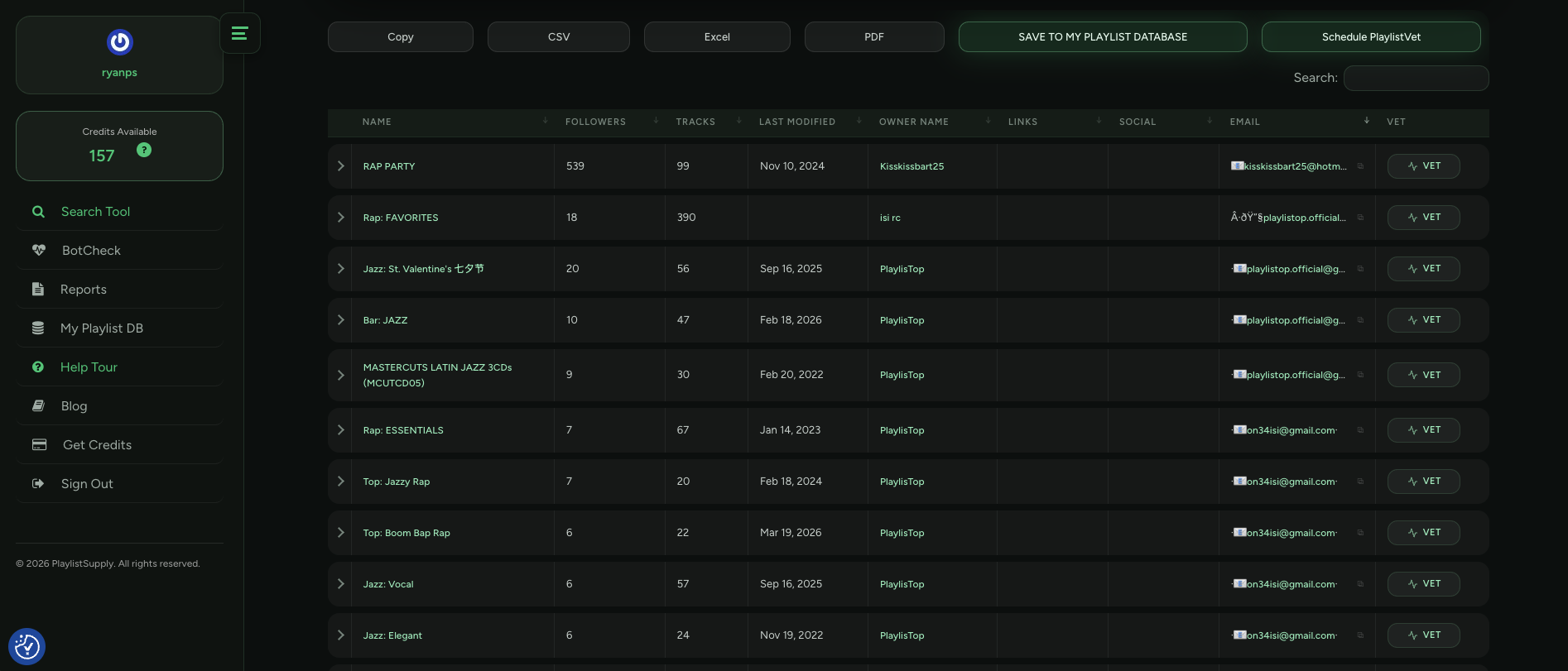
PlaylistSupply searches public playlists in real time and returns each match with its follower count, track data, playlist owner, links, socials and a curator email where one is available. Nothing comes from a stored list; every result reflects the playlist as it exists at the moment you search. You find the playlist and its contact in one search instead of researching each playlist separately.
Step 2: Find Curator Contacts With Similar Artist Search
Keyword search is fast, but broad genre terms return broad playlists. Similar Artist Search is the more targeted route. Instead of a keyword, you enter an artist whose sound is close to yours. PlaylistSupply finds comparable artists and reads the Spotify Discovered On playlists connected to them, the playlists Spotify itself credits with sending listeners to those artists.
The results are brought together into one list of playlists already connected to music like yours, each with the same owner, links, socials and curator email columns. A curator who is already programming your lane is far more likely to open your pitch than one who matched a genre word, and the Discovered On signal means the playlist is actually driving listeners. If you want the background on that signal, read Spotify Discovered On playlists explained.
Step 3: Read the Curator Email and Social Columns
One of the most important parts of a PlaylistSupply result is the contact data that sits beside every playlist. When a curator has made contact information public, the result shows it directly: the email address, Instagram and other social accounts, the website and any link page. You can also focus the results on playlists where contact details are available, so the list you build only contains people you can actually write to.
| Column | What It Tells You |
|---|---|
| Name and Followers | The playlist title and its follower count, the first read on genre fit and reach. |
| Owner | The account that runs the playlist, so you know who you are writing to. |
| The curator contact email, where one is available, ready for a direct pitch. | |
| Socials | Instagram, X, TikTok and other profiles the curator has linked, a second route when no email exists. |
| Links | Websites and link pages, which often hold a submission form or a pitch policy. |
| PlaylistVet | The quality score that tells you whether the playlist drives real discovery before you pitch. |
Not every curator makes their information public, so contact details will not appear for every playlist. That is the honest reality of curator outreach, and it is why the filter matters: you spend your pitches on the 100K+ curator contacts that exist rather than on playlists that were never reachable. Keep the outreach list workflow in mind as you go, because the contact column is where that list starts.
Step 4: Search YouTube Curators Too
PlaylistSupply is not limited to Spotify. One toggle switches the same search to YouTube Playlist Search, which finds YouTube playlists by keyword, genre, mood, activity or similar artist. YouTube results show playlist views, video count, channel name and subscribers, plus the channel's links, socials and a curator email where one is available, so you research curators on both platforms from one screen.
YouTube curators are often easier to reach because channels can publish a business email directly, and a placement there can keep delivering views through search and suggested videos long after the pitch. The YouTube Playlist Search announcement explains how the toggle works, and the YouTube channel directory lets you browse the channels we index.

Step 5: Save Curators to Your Playlist Directory
Once you find playlists and curators that fit your music, save them to your Playlist Directory inside PlaylistSupply. The Directory keeps every target playlist with its curator information in one organized list, so you build on the research for each new release instead of starting over. You can review saved playlists with their contacts, group them by campaign and come back to the ones that placed you last time.
If you run campaigns outside the platform, the results export to CSV, Excel or PDF, and the Playlist Directory guide shows how to turn that list into a release-by-release outreach system. The free Spotify playlist curators directory is a good place to browse curators by genre before you log in.
Build your curator contact list today
Search by keyword or similar artist, filter to playlists with contact details and save the curators to your Playlist Directory. Plans start at $19.99 for the first month.
Get Playlist Contacts See PricingStep 6: Check Playlist Quality Before You Contact the Curator
Finding an email does not mean the playlist deserves a pitch. Follower counts can be bought, and a botted playlist with 50,000 followers will cost you a pitch, possibly a placement fee and sometimes your Spotify standing. PlaylistVet runs on every Spotify playlist in your results and reads Spotify Discovered On data to show whether the playlist is generating genuine artist discovery rather than just carrying a follower number.
The workflow becomes: find the relevant playlist, identify the curator, check the playlist's quality, then decide whether it belongs in the campaign. Our PlaylistVet guide explains how the score is built, and the free playlist bot checker lets you test any playlist link without an account.
Step 7: Pitch Curators From Your Own Gmail
Once you have the right curator, PlaylistSupply handles the outreach too. Auto-Pitch connects your Gmail account and prepares the pitch from your own address, with the curator name, playlist title and your music link already filled in. You personalize the message before it goes out, and because it is sent from your Gmail, replies come straight back to your inbox rather than to a tool.
That turns the whole process into one workflow inside PlaylistSupply:
Search for playlists → Find curator contacts → Check playlist quality → Save the playlist → Pitch the curator
For the pitch itself, keep it short, name the playlist, say in one line why the track fits and include a direct link. The Auto-Pitch walkthrough covers the Gmail connection, and how to pitch Spotify playlists covers what to write.
How to Find Playlist Curator Contact Information Step by Step
Here is the complete process in order, the same seven steps you can repeat for every release:
- Search for playlists by keyword. Type a genre, mood, activity or playlist keyword into PlaylistSupply the way a listener would, such as indie pop, deep house, chill rap or workout music. The search runs live against public playlists and returns each one with followers, track data, the owner, links, socials and a curator email where one is available.
- Run a Similar Artist Search. Enter an artist with a sound close to yours. PlaylistSupply finds comparable artists, reads the Spotify Discovered On playlists connected to them and returns the playlists already driving listeners to music like yours, with the same contact columns.
- Read the curator email and social columns. Each result row carries the curator email, Instagram, website and other links the curator has made public. Filter the results to playlists where contact details are available so your outreach list only holds people you can actually reach.
- Switch the toggle to YouTube. Flip the platform toggle from Spotify to YouTube and run the same search. YouTube results come back with views, video count, channel name, links, socials and a curator email where one is available.
- Save the playlists to your Playlist Directory. Save every playlist worth pitching to your Playlist Directory so the list survives between releases, or export it to CSV, Excel or PDF if you manage campaigns in your own sheet.
- Check playlist quality with PlaylistVet. Run PlaylistVet on each Spotify playlist before you write to the curator. It reads Discovered On data to show whether the playlist drives real listener discovery, so a large follower count with no discovery activity is removed from the list before you spend a pitch on it.
- Pitch the curator from your own Gmail. Connect Gmail with Auto-Pitch and send the pitch from your own address. The draft carries the curator name, playlist title and your music link; you personalize it, send it, and replies land in your own inbox.
Finding Curator Contacts by Hand (When You Need To)
Sometimes you will want to reach a specific curator whose contact did not surface, and the manual route still works for one-off cases. Start with the playlist owner's Spotify profile and look for a linked website or a name you can search. Check Instagram, X and TikTok for an account with the same name and playlist artwork, and read the bio for a link page or an email. Search the playlist name together with words like submit, submissions or contact, because many curators run a form on their own site. If the playlist belongs to a label, blog or brand, its website contact page is usually the right door.
Treat anything you find this way with care. Confirm the account really belongs to the curator before you write, never pay for a placement, and keep your pitch short. For curator lists you can build for free, see how to build a Spotify playlist curator email list.
Ask for Curator Contacts in ChatGPT or Claude
If you already work in an AI assistant, Connect AI brings the same search into ChatGPT, Claude, Claude Code, Cursor or VS Code. Ask in plain words for playlists that fit your track and the assistant runs the PlaylistSupply search, returns the curator contacts where available and vets the playlists, using the same credits as the web app. The Connect AI guide covers the setup for each app and what every request costs.
A Faster Way to Find Playlist Curator Contacts
Manually finding playlist curator information means hours across Spotify profiles, YouTube channels, websites and social accounts, much of it spent on playlists that turn out to be unreachable or not worth pitching. PlaylistSupply brings those steps together. You search Spotify and YouTube playlists by keyword or similar artist, read the curator emails and socials that are available, save the playlists to your Directory, check their quality with PlaylistVet and pitch the curator from your own Gmail.
Instead of spending most of a campaign searching for contact information, you spend it on the part that actually places the song: choosing the right curators and writing them a pitch worth answering. And if your promotion runs past playlists, the same team builds Booking-Agent.io for venue and talent buyer contacts and RadioPromo.io for radio station and program director contacts.
Start finding curator contacts now
Real-time Spotify and YouTube playlist search, curator contacts where available, PlaylistVet quality checks and Auto-Pitch, all in one tool. Cancel anytime.
See Pricing Try the Free Playlist CheckerFrequently Asked Questions
How do I find a playlist curator's contact information?
Search for the playlist in PlaylistSupply by keyword or similar artist. Every result comes back with the curator email, social profiles and links the curator has made public, where available, so you find the playlist and its contact in the same search instead of researching each curator by hand.
Does every playlist curator have a public email address?
No. Many curators never publish an email, and some only list an Instagram account or a website. PlaylistSupply shows whatever the curator has made available and lets you filter to playlists where contact details exist, so your outreach list only holds people you can reach.
Can I find YouTube playlist curator contacts as well as Spotify curators?
Yes. One toggle switches the same search from Spotify to YouTube. YouTube results show playlist views, video count, channel name, links, socials and a curator email where one is available.
What is Similar Artist Search and how does it find curators?
Similar Artist Search takes an artist with a sound close to yours, finds comparable artists and reads the Spotify Discovered On playlists connected to them. The playlists it returns are already driving listeners to music like yours, which makes them far more relevant targets than a broad genre keyword.
How do I know a playlist is worth contacting the curator about?
Run PlaylistVet on it. PlaylistVet checks the playlist against Spotify Discovered On data to show whether it generates real artist discovery. A playlist with a big follower count but no discovery activity is the classic sign of bought followers or bots, and no contact is worth a pitch there.
Can I email curators directly from PlaylistSupply?
Yes. Auto-Pitch connects your own Gmail account and prepares the pitch with the curator name, playlist title and your music link. You personalize it and send it from your own address, and replies come back to your inbox.
Is PlaylistSupply a curator contact list or database?
No. PlaylistSupply is a real-time search engine for public Spotify and YouTube playlists. Every search runs live, so the playlists, stats and contact details reflect what exists at the moment you search rather than a stored list that goes stale.