Start with the free playlist directory
The fastest Spotify playlist finder is a directory you can browse without a login. PlaylistSupply publishes a free playlist curator directory with more than 2,300 curators, tens of thousands of individual playlist pages sorted by genre, and a live top-100 curator list you can download as a CSV. Every entry shows the playlists a curator runs and their follower reach, and every playlist can be checked with the free PlaylistVet playlist checker before you spend a pitch on it.
The directory answers the first question, which playlists exist for my sound. The tool answers the second, how do I reach the curator and keep track of who I pitched. That second part is the Playlist Directory inside PlaylistSupply, explained below.
Inside the tool: your own Playlist Directory
The Playlist Directory inside PlaylistSupply makes organic playlist pitching and finding playlist contacts information far more organized and accessible. It implements a more advanced way to organize, save, export, and pitch playlists submissions to playlist curators.
Members have a dedicated place within the Playlist data tool to save the playlist curators they choose through searching to streamline playlist submissions so they can easily come back to their profile and start reaching out.
Log into the PlaylistSupply tool on our page as you would for a normal playlist pitching campaign and load up a new search for playlist contacts. The Playlist Directory controls sit right in the search results
In the top right of the search portal you will find a button that says “My Playlist DB”. This is where you can find your personal Playlist Directory with all of the playlists and their curator contacts information you have selected for submitting and playlist pitching during your search.
On the left side of each playlist after a search you will see a checkbox. This checkbox will mark that playlist contacts or curator as selected. You can select multiple playlists and save the best playlist curators to target for your playlist pitch.
At the top of the playlist search results you will see a button that says “Save To My Playlist Database”. This will take all of your selected playlists and playlist owner contacts and add them to your personal Playlist Directory to be used for playlist submission to curators.
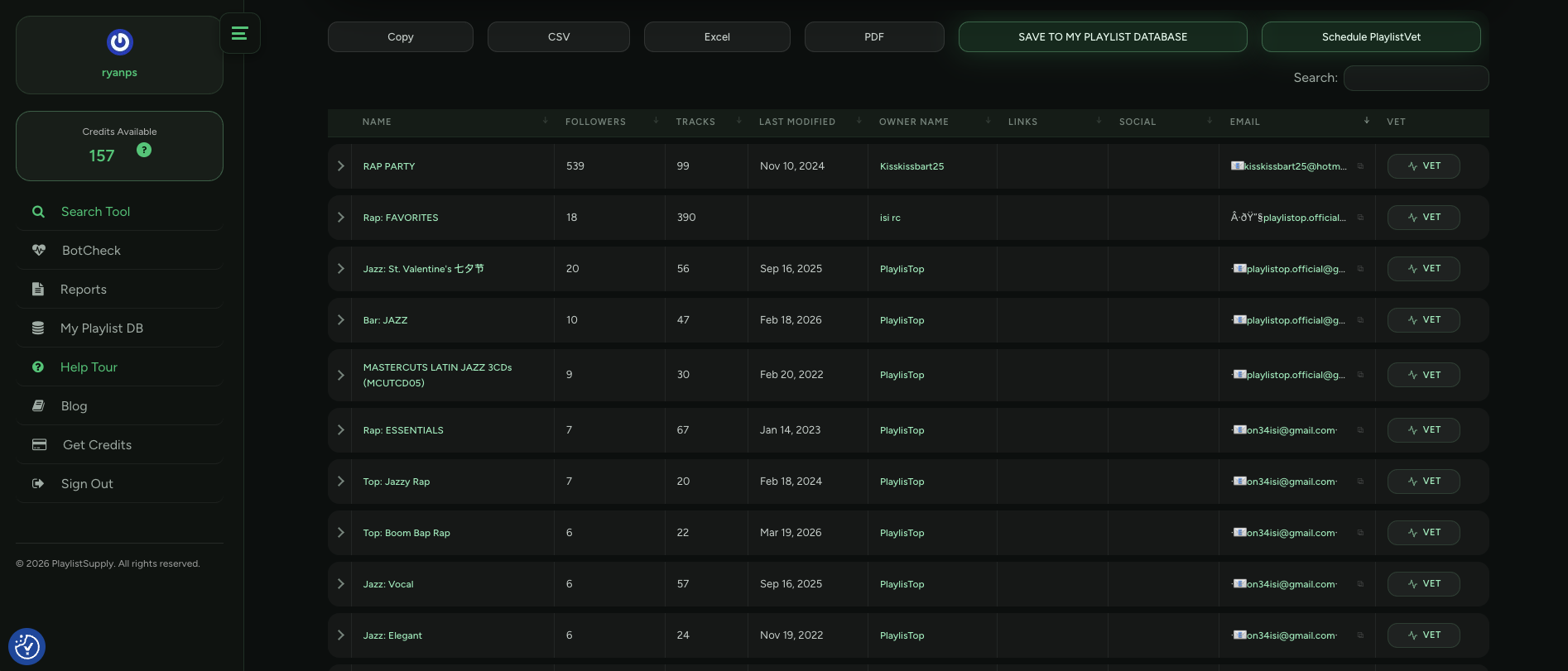
In your personal Playlist Directory
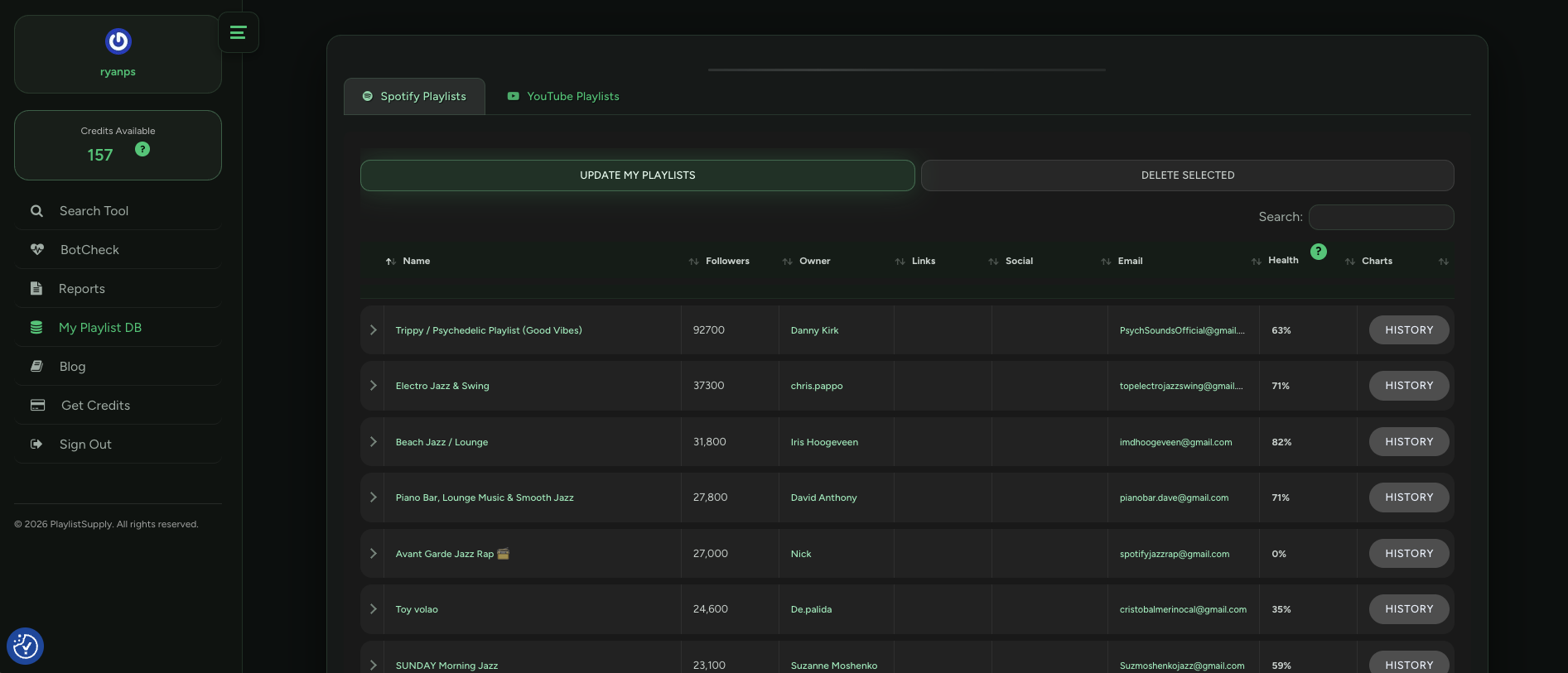
…you can manually update and refresh the data of any selection of playlists see the latest growth or changes of the playlists’ data. Once you find a quality playlist curator you can save that to your Playlist Directory and monitor as it gains more streams, listeners, and followers!
These changes can be seen by the change in color of numbers as data points like track counts or followers increasing/decreasing. Monitoring how a playlist’s followers or data points change can allow you to feel confident you are reaching out to quality playlist contacts.
Before the Playlist Directory existed, organizing or sorting your searches for playlist pitching and playlist curators had to be done after exporting search results to your computer. The Playlist Directory makes playlisting faster and easier while having results saved directly to your playlisting database.
In your personal Playlist Directory you can collect playlist owner contact information from any searches about any genre, artist, or keyword and save them all in the same place.
This playlist data can be refreshed for any amount of playlists whenever you like within your Playlist Directory to keep your contacts and information about their playlists up-to-date. This will help you to observe a particular playlist owner without running the same searches over and over again.
Once you find a verified quality playlist owner’s contact you can save that to your Playlist Directory and monitor as it gains more followers or becomes more popular!
This way you don’t have to export all of your playlist information anymore and you can filter them faster than ever to find out which of your playlists has the most followers, latest playlist activity, or many other interesting facts about your saved playlist data. Filtering and analyzing playlists is unavoidable for a successful playlist curator outreach campaign.
The Directory tool allows you to run your entire playlist outreach campaign directly from the playlist owner finder tool without having to organize or export spreadsheets on your own computer. This simplified playlist promotion process allows you to spend more time reaching relevant playlist owners and locking in playlist placements. You can read more about our tips and tricks for playlist marketing and pitching here.
Also inside the tool: PlaylistSupply’s Similar Artist Search
PlaylistSupply also includes Similar Artist Search, which lets you search by artist name for the playlists and playlist curators that carry that artist in their Spotify Discovered On section, the only playlists proven to move the algorithm. These searches might only generate a small amount of direct contact information so it is best practice that you run many searches with this feature to get the best results when running your playlist submission campaign.
This feature lets you find the best playlists that have high traffic for an artist, so we recommend having a list of as many relevant artists so that you can easily find the right playlists to pitch your music to for your entire genre or style of music. You can also find lists of similar musicians for each artist on their Spotify profile. This allows you to discover new artists relevant to you in order to expand your playlist data results and therefore your audience.
READ: How to find legit high quality playlists using PlaylistSupply’s Similar Artist Search
How Similar Artist Search works
Similar Artist Search does not guess from playlist titles. It works backwards from artists who already sound like you:
- You enter an artist whose sound sits close to yours.
- PlaylistSupply pulls that artist's five closest similar artists.
- It then reads the Discovered On section for the artist you entered and for all five of those similar artists.
Discovered On is Spotify's own list of the playlists genuinely driving streams to an artist. So what comes back is playlists with proven traffic for your exact sound, rather than playlists that simply happened to match a keyword. That is the difference between a playlist that looks relevant and one that is already moving listeners for artists like you.
As the music industry evolved more towards the digitization of music it is becoming increasingly difficult for indie artists and record labels to break through with their music. The Playlist Directory is part of our goal to make getting playlisted more efficient and accessible. We strive to set ourselves apart from other playlisting and playlist services by simplifying the playlist submission process with a next level playlist contact finder tool.
Throughout 2026 we will be improving and adding features that enable artists to get more streams, gain new fans, and progress their careers as efficiently as possible through playlist marketing.
PlaylistSupply supports YouTube playlist research as well. With YouTube Playlist Search, artists and managers can apply the same directory-and-outreach process used for Spotify playlists to YouTube: search by genre, mood or keyword, review playlist and channel metrics, and save curator contact information all within the Playlist Directory. This cross-platform capability empowers independent artists to reach new audiences beyond Spotify and streamline their outreach across platforms.
Visit PlaylistSupply.com to get started today.
Want more info? Watch the video below by rising artist Adrian Barrin on how to use PlaylistSupply for playlist promotion!
From Finding a Playlist to Reaching the Curator
Similar Artist Search finds the playlists that fit your sound, and Auto-Pitch handles the next step. When you find a playlist worth pitching, Auto-Pitch sends your message from your own Gmail, using send-only permission so it cannot read your inbox, and every reply comes straight back to you. Auto-Pitch is included on the Viral plan and higher.
Find the curators behind the playlists
Search Spotify and YouTube playlists in real time, screen quality with PlaylistVet before you pitch, and reach available curator contacts directly, all on a flat subscription.
Try PlaylistSupply